My next computer…

So I’m typing this on the ancient (2005) eMac. It’s a fine computer, although, once you move to flat screens you can never look back. Plus, it’s a powerpc chip, so Leopard is the end of the line; Apple’s going to un-support PPC starting with Snow Leopard.

Also, it’s too slow to run Handbrake, and it’s no speed demon when I do anything with ImageMagick. Other than that, it’s a fine PC and I could cheerfully go on using it indefinitely.

But what would I replace it with? Well, I could get a Mac mini for $800 and up, or an iMac for $1200 (and up). There’s a lot to be said for both possibilities.

But here’s another thought. How about getting a Windows laptop and putting Linux on it — or better yet, a windows laptop with Linux preinstalled, like the Dell Inspiron 1525N. That would cost me $575 and up.

(Or I could build my own system for probably the same price. That isn’t as much fun as it was 10 years ago, mainly because I wouldn’t save any money over store-bought, but it would let me upgrade the hard drives over time. I’d probably never get the power management working right, though.)

Linux runs every single program I use on a daily basis, except two. One is MarsEdit, which I’m using to write this post. The other is iTunes, which I use to sync my iPod. (I don’t think I’d need Handbrake with Linux; I assume someone has already put a pretty front-end on ffmpeg.)

I could live without MarsEdit, not because it’s bad software — in fact, it’s excellent, best-in-breed software — but because I just don’t blog as much as I ought to.

That leaves syncing my iPod. And there I’m stuck.

But wait. How about this: run Windows in Virtual Box on Linux, and run the Windows version of iTunes? Whoa! That’s, like, genius, dude.

(I wonder what’s the cheapest I can get a legal copy of Windows for on eBay?)
Political Convention Venues

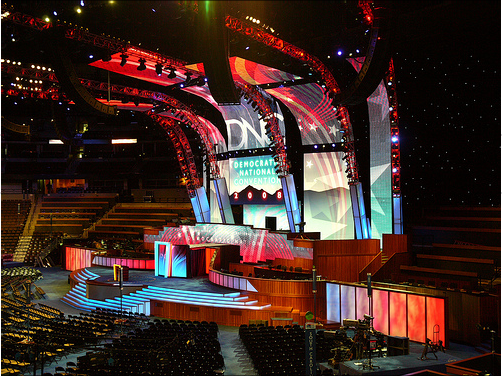
I see the Democrats are upholding their long tradition of restrained good taste:

DNCC Podium

For me, it’s the lighted stairs that really make this. (Original slideshow here; requires Flash.)

Meanwhile, the Republicans apparently never saw the last reel of Attack of the Clones:

I know this is just an artist’s rendering, but it looks like something from Triumph of the Will.

(via Hot Air.)

Anonymous Font

Most of what I do on the computer is in a terminal window. I actually bring up gvim to write my sermons, but unless you’re in the trade, you wouldn’t see the difference. The point is that less and less do I use fancy graphical interfaces with fonts and so forth to do my work. More and more do I regress back into the comfortable 80×24 existence of my tender years. (Except I prefer something more like 80×35 or 80×40, if I can get it.)

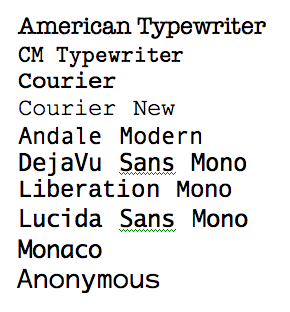
Terminal windows require a monospaced font. Monospaced fonts are fonts where each letter takes up the same amount of room: a capital I and a lowercase w are equally wide. Here are some examples:

Monospaced Fonts

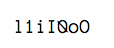
The problem is that most of them don’t work so well. Some are just wrong. For example, Courier New is too spindly to be of any use at all. Others make terminal.app crazy (DejaVu and Liberation, I’m looking at you). So mostly, I use “Monaco” or “Lucida Sans Typewriter”. The problem with those is they aren’t really programmer fonts: they don’t help you distinguish between ambiguous glyphs like lowercase L and 1, or capital O and zero (0), like this:

Anonymous Font (letters)

Plus, every programmer worthy of the name wants their typewriter text to look typewriter-y. I used to think this was to be like K&R (Courier), but later on I realized it was to be like Knuth (CM Typewriter).

Anyway, a couple of years ago, I stumbled onto profont, which seemed like it was exactly what I wanted. But it wasn’t.

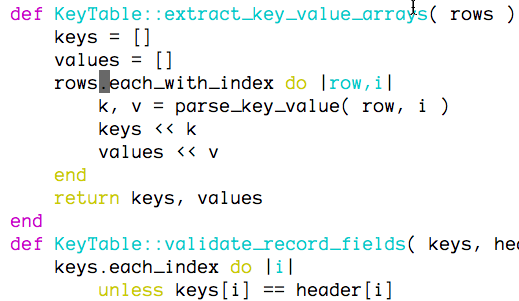
Today, I found Anonymous. Behold:

Anonymous Font

Light but not spindly. No way to confuse your ones and L’s. Oh, joy! Raptures!

Engle Institute concluded

People keep telling me I need to turn the knob to 11. Easier said than done. Also, I need to quit trying to lead in program development and instead to lead in theological reflection. If I do that at all well, then programs will follow. (Sigh.)

Anyway, it’s been an awesome conference. It was good to see so many PTS people and to meet some non-PTS folks. Worship at Miller was excellent as always.

Remembering Midway

I was surprised and pleased when I saw that Wired’s interesting historical fact of the day for today was the Battle of Midway. Good on yer, Wired!

(It’s an interesting observation they make. The “tech angle” here that this was the 2nd naval battle in which the fleets never made visual contact with each other. That is, it was a naval battle decided not by battle ships but aircraft carriers. We lost only one, the Yorktown. I’ve been aboard the aircraft carrier Yorktown, but it wasn’t the one sunk at Midway.)

iPod Movies

I’ll be doing some air travel this summer, and ever since I got my iPod — egad! I never wrote a blog entry about the wonder that is my iPod! what kind of lazy blogger am I? I’ll do that Real Soon Now. Anyway, about my air travel…

So, I went to the iTMS store to see what it would cost me to get a movie for the trip. I was stunned to see how much they cost. (For example, $14.99 for The Incredibles.) Very quickly I decided that I would have to make my own, because the store-bought ones were just too spendy for my limited budget. I already got a copy of The Incredibles, for example. So all I had to do was learn how to rip dvds for ipod.

By that query was I introduced to Handbrake. And you know what? It just works. I give it a “Cool Tool” award. Thumbs up.