The first package I always install on a Ubuntu system is the OpenSSH server:
$ sudo apt-get install openssh-server
Doing that lets me ssh over to the new system. I can also scp the “virgin install” screenshot. Here it is:
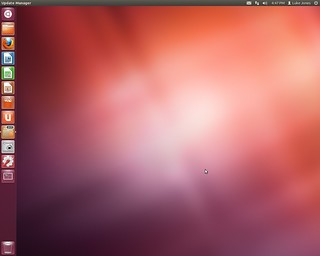
The first package I always install on a Ubuntu system is the OpenSSH server:
$ sudo apt-get install openssh-server
Doing that lets me ssh over to the new system. I can also scp the “virgin install” screenshot. Here it is:
I recently had the opportunity to purchase four (4) HP RP5700 systems at $20 each. I’m not entirely sure what I’ll do with the others, but I’m installing Ubuntu Linux on one of them. Here are some notes along the way.
It’s odd how difficult Ubuntu makes it to find the checksums (MD5 hashes) for the ISOs you download. Forget security, how do you know it downloaded properly? It turns out there’s a whole separate page telling you what the checksums are.
Burning CDs is hopeless. Optical discs are such an amazingly useless medium. About one in four works at all, and those suffer from bit rot even quicker than floppy disks used to. The instructions for making a CD are fine, but the Burning ISOs HOWTO is available if you have problems.
I’m so glad we have USB sticks now. The instructions for making a bootable USB stick are somewhat arcane, but I have the computer science background that makes it look easy.
I had problems installing the bootloader. That’s a fatal error, I understand, from an otherwise unhelpful dialog box. A whole bunch of searching around brought this page to my attention, which explains what to do about certain kinds of grub installation failures.
One of the things I do every week is turn a recording of my sermon for the week into a podcast. (Find them here and in these archives.) That’s a pretty complicated process, so some people just upload the audio file to a hosting service that does the rest.
But getting the audio file is the part I wanted to talk about, because I just bought a new waveform editor, and I wanted to post my impressions and some very subjective reviews of the alternatives I considered.
For years, I’ve used Amadeus by HairerSoft. I like it and it has all the features I need. It has a great many more features than I need, for that matter. One of its many features is the ability to check for upgrades. That’s great as long as they’re free minor upgrades. Sometime about six (?) months ago, however, it came out with a non-free major upgrade, and the upgrade-check software gives me an obnoxious dialog that says “Cancel” where it ought to say “Not now” or “Maybe later.” So that’s been bugging me.
Unfortunately, they wanted $40 to upgrade. Now, that’s a fair price to pay even if there aren’t any new features. I’d be happy paying $40 every two or three years, just to keep them in business issuing the minor fixes for new OS compatibility or whatever.
So why “unfortunately?” I say “unfortunately” because they also sell a non-upgrade version on the Apple App store, and that’s the one I wanted. I really like the App store, not least because it means I can install the software on either of my Macs, because App store apps work on up to five (?) machines.
But there’s no way to get the upgrade pricing on the App store. Sigh. That meant I had to think about what I was doing. I hate when that happens.
There are three or maybe five competitors to Amadeus:
Garageband. This actually might do the trick. I just don’t want to go to the trouble of figuring out how to use it for a podcast.
Logic Pro. Like Garageband but more so, and with a $200 price tag.
Audacity. A great price plus the joy that comes of using an open source app. The problem is, the user experience on a Mac isn’t what I would like. (To be fair, I can’t even remember what it is that I didn’t like. Maybe they wanted you to use X11. Not happening.)
WavePad by NCH. This is an interesting piece of software: beside the Mac, it’s available not only for Windows but for iOS (iPhone, iPad, and iPod Touch). What I liked: explicit support for 24-bit sound files. What I didn’t like: it’s not as quick as Amadeus. That matters when you’re working with 800 MB .wav files.
Fission by Rogue Amoeba. Like: the name, especially for a company with “Amoeba” in its name. The feature set seemed pretty slimmed down compared to WavePad and Amadeus, but enough to do my work. Interestingly, it offered an envelope feature.
Ultimately, it came down to price. WavePad has a free version, but the paid version was more than my budget. I went with the upgrade to Amadeus, since it was the same price as Fission.
P.S. While I’m writing this, I should mention Levelator. It is why I don’t know all the cool features in Amadeus or need them in Fission/WavePad/what-have-you. You drop an audio file into it, and it levels out the sound a lot better than I could.
P.P.S. One of the things I should look for is the ability set the ID3 tags. I didn’t even think to look when I was comparing the editing features, but once I got done and purchased the upgrade, I wanted (for the 100th time) to set iTunes-recognized ID3 tags for the podcast. You can do that within iTunes but you have to round-trip it through there to do so. I’d like something that I don’t have to add to my iTunes library. All my favorite preachers’ sermon podcasts have nice ID3 tags, but I’m too lazy to do it right.
They say that Pluto isn’t a planet any more, but I’m not convinced. (If you come from New Mexico, that would be treason.) As may be. Whatever it is, Pluto’s got moons. I knew about Charon, but now they’ve discovered another one.
One of the best lines:
The movie was unbelievable (that is, even for a movie about a superhero, it just made it impossible to keep your disbelief suspended). But it had some great lines.
Here’s what’s so weird about living in Alaska. It’s late, and I’m tired, and I look out the window and the sun hasn’t even set yet!

I liked this video from Neal Stephenson promoting a kickstarter project to finance better sword-fighting in computer games.
When Apple switched from GCC to LLVM in Xcode 4.2, they made it significantly more difficult for me to run ruby 1.9.2. (What are the odds this will get easier with Mountain Lion?)
I was using rbenv and its rbenv-build plugin to install ruby 1.9.2 and it told me this:
$ rbenv install 1.9.2-p320

ERROR: This package must be compiled with GCC, but ruby-build couldn't
find a suitable `gcc` executable on your system. Please install GCC
and try again.

DETAILS: Apple no longer includes the official GCC compiler with Xcode
as of version 4.2. Instead, the `gcc` executable is a symlink to
`llvm-gcc`, a modified version of GCC which outputs LLVM bytecode.

For most programs the `llvm-gcc` compiler works fine. However,
versions of Ruby older than 1.9.3-p125 are incompatible with
`llvm-gcc`. To build older versions of Ruby you must have the official
GCC compiler installed on your system.

TO FIX THE PROBLEM: Install the official GCC compiler using these
packages: https://github.com/kennethreitz/osx-gcc-installer/downloads

You will need to install the official GCC compiler to build older
versions of Ruby even if you have installed Apple's Command Line Tools
for Xcode package. The Command Line Tools for Xcode package only
includes `llvm-gcc`.
Note: when you install that, it doesn’t (appear to) provide an uninstaller. Instead it says this:
If something doesn’t work as expected, feel free to install Xcode over this installation.
Once installed, you can remove Xcode completely with the following:
sudo /Developer/Library/uninstall-devtools –mode=all
Bummer for me, huh? Mercifully, the GCC installation package doesn’t mess up the llvm-gcc link in /usr/bin/gcc. But that means when I do the ruby build, I need to add:
export CC=/usr/bin/gcc-4.2
So I looked at the list of 200 new features in Mountain Lion and … meh.
If there’s a company in the world that they didn’t pick in preference to Google, though, I couldn’t figure out what it is. I mean, really: a feature to let you access Vimeo?
I wonder how much of that linkage is built on APIs where you can connect to other alternative services? I understand that Apple feels threatened by Google (why, I can’t imagine, except their legendary paranoia) and wants to partner with everyone else. (Vimeo!?) But I want to put together a best-of-breed workflow. I don’t want a Safari reading list, I want Instapaper. I don’t want Safari bookmarks, I want Pinboard. But I’ll get what Apple thinks I should have, which means the services that are dumbed down enough for computer novices to use on their phones.
Except when those services are business partners of Apples. Like Facebook. I don’t want or need hooks to Facebook, but I’ll be surprised if any way to turn them completely off, either. I wonder how much of my activity leaks over to Facebook, and how does much does Apple get for selling to to them? (And since when does Apple overhang the market like this? Fall availability? Why wasn’t it ready in time for the general release of Mountain Lion?)
As for iCloud…. I’d love it if iCloud did what I want, though. I’d love to share calendars with my family members. I can do that now with Google Calendar. Apple says I will be able to do it now with iCloud. That would be a welcome improvement. It’s not clear that you can do that with your contacts, bookmarks, notes, and reminders, though.
(That is another problem with all the social-media linkage, as well. The social media sites all want me to have one persona. What good is it if Twitter is linked into everything I do, so long as it’s just one Twitter account? And Facebook won’t even let me have multiple accounts.)
Whatever.